

Hallowe’en Resources
Hallowe’en is almost here and teachers are at the moment doing classroom planning with a view towards using the season of Hallowe’en in teaching different areas across the curriculum. Seomra Ranga has a dedicated section of classroom resources with a Hallowe’en theme. Some of the latest Hallowe’en resources added to the site include a Rockets language poster; a Make a Potion poster with language to help when creating a witch’s potion; a poster to help pupils to describe a witch in creative writing; a Spooky Sounds poster using the theme of hallowe’en to teach the silent letters k and b; a set of colourful Hallowe’en posters; a set of colourful Oíche Shamhna posters; a set of flashcards with Hallowe’en vocabulary; Hallowe’en Classroom door signs. There’s plenty more Hallowe’en classroom resources. You can download them all freely.

Logainmneacha na hÉireann
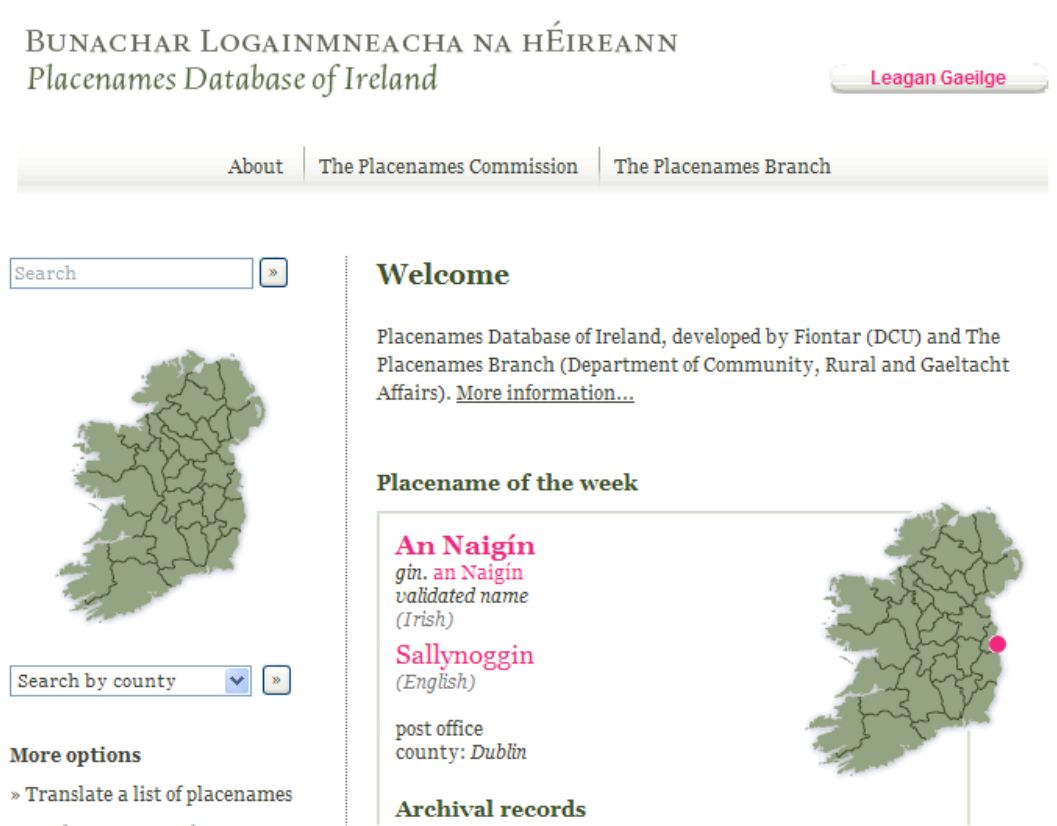
Logainm is a new website containing a database of the placenames of Ireland. The site comes in an English version or a Gaeilge version and you can switch between both quite easily. The purpose of the site is to make available to the public Irish place names that have been officially approved by the Placenames Branch, and these names can be searched either through Irish or through English. If you simply want the correct translation for a particular placename, you can do a search on the homepage. If there is more than one place with the same name, you will be given all the possibilities and you can select which one applies to you.
If you want to do some research about the placenames in your locality, you can either click your county on the map on the homepage or you can use the dropdown box, also on the homepage. When you get to your county you have the option of finding out about the county under any of the following headings: baronies, electoral districts, parishes, townlands, rivers, bays, hills, promontories, bridges, waterfalls, features, population centres, lakes, islands and archipelagos, post offices, monuments, mountains/mountain ranges, streets, strands. If, for example, you wish to search about the parish in which your school is located, you click parishes and then click your local parish. You may then wish to find out about the townlands in the parish so you can click townlands. You can then click on any of the individual townlands in your locality. You will then be given the name of the townland, the name in Irish (if it has been officially verified), the hierarchy of the townland (i.e. the county, the barony, the parish, the townland). If there are any archival records pertaining to the name of the place they can also be viewed. These are scans of original documents citing the names of the place. In the cases of counties Waterford, Galway and Donegal, sound recordings of some of the placenames are available in both Irish and English and these give the official pronunciations. It is intended that in the future sound recordings will be made of all the other counties on a phased basis over the coming years.
This website should prove to be an invaluable resource to schools and teachers. The site will be an excellent reference point when researching local history. The site is really easy to use, well laid out and should be a site to be bookmarked to dip in and out of again and again. The site can be accessed at:

Seomra Ranga’s First Birthday
The Seomra Ranga website is one year old and it’s been a busy year. The number of visitors to the site has been steadily growing throughout the year to a total of almost 67,000 unique visits during the past twelve months. This month alone (September) has been the busiest month so far with visitors totalling 12,000. This is more than double the number of visitors for the first month of the website last year.
I’m constantly trying to develop and provide new resources for the site. However, during the second year of the site, I’d really like to see more resources and lesson plans being shared by more of the visitors to the site. So if you’ve benefited by downloading a resource from the site, perhaps you could consider uploading a new resource in return. Here’s to the development of the site during the next twelve months!

Signs and Posters
 A selection of new posters and signs for the classroom has now been uploaded onto the Seomra Ranga website. There is a series of posters on “Mothúcháin”; a series of posters on Music Notation to help pupils learn the main symbols of music notation; a series of posters on “Ainmhithe sa Zú” with illustrations and captions as Gaeilge; a series of Sports posters as Gaeilge with each poster bearing the phrase “Bain taitneamh as ……”; a series of posters on “Uimhreacha 1 – 10”; a series of labels for “Postanna sa Sheomra Ranga” – jobs that might be allocated to pupils in the classroom; a series of flascards with the names of the Gifts of the Holy Spirit for the teaching of Confirmation; a series of flashcards with the names of the Fruits of the Holy Spirit for the teaching of Confirmation; a series of posters of dathanna as Gaeilge; a series of flashcards with foclóir le haghaidh Cluiche Boird – phrases to teach the pupils when playing a board game as Gaeilge; a series of posters of fractions – halves, quarters and eighths. All the posters are in .pdf format and should be relatively easy to download and print. Please let me know if there are any errors or omissions and they can be rectified immediately. If anyone has suggestions of posters, signs or labels that they think may be useful in the Seomra Ranga please let me know at info@seomraranga.com

Moneyville
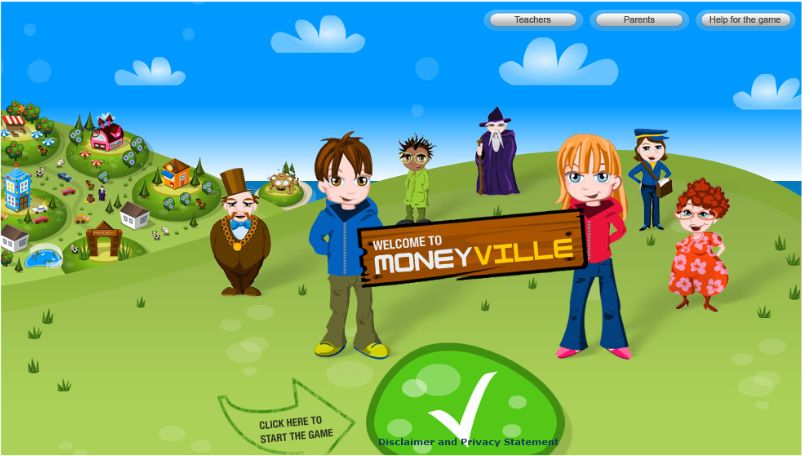
Moneyville is a new Irish website with the aim of teaching younger children more about money, the value of money and saving money. This is a flash-based site which is very colourful with a high standard of animation. It should be instantly attractive to young children. The introduction to the adventure is explained by the Mayor of this fictional town called Moneyville. The central character in the adventure appears when you first enter a username and password. You can change the look of the central character by changing his clothes, hairstyle etc. There is a lot of speech on the website with characters giving you instructions. You can choose to have this text also on the screen. This may be helpful to pupils with hearing difficulties.
When you enter the town of Moneyville, you can visit the Post Office, the Apple Stall or the Time Machine. In each place you visit, you can work to earn some money. In Moneyville you can earn silver and gold coins. One gold coin is worth ten silver coins. At any time you wish, you may visit Pennies shop and spend some of the money that you have earned. The idea that the site is trying to get across to children is that you have to work hard to earn some money and that there may be some things in the shop that you cannot afford. If this is the case and you really want the item, you can save your money until you have enough to buy the item. The pupil can place some desirable items in the Wish Jar until they have saved up enough money to buy them.
In the Post Office the pupil has to help out with the deliveries by sorting out the most expensive items from the less expensive items. This encourages children to understand the value of certain items. By helping in the Post Office, the pupil can earn some money. At the Apple Stall, the pupil has to catch apples falling from the apple tree before they hit the ground. This helps with keyboard skills and money can be earned by doing this work. When the pupil visits the Time Machine they can go on their travels. However, they need to have already earned some money as it costs one gold coin to go on a trip. The trips can take the pupil back to the time of the dinosaurs, back to Ancient Egypt, back to Ancient Rome or back to the Middle Ages. In each place they have fun things to do.
When pupils have done lots of the games and adventures on the site they can visit the Sorcerer who knows where there is treasure hidden in Moneyville. To get the Sorcerer to reveal the whereabouts of the hidden treasure, the pupil has to answer questions about money which they will have learned by visiting different areas of the site. If they can answer the questions correctly, they can find the hidden treasure and spend the money in the shop.
This website is set up by National Irish Bank which obviously has an interest in encouraging the customers of the future to save money and spend wisely. However, this is a very worthwhile website and is a positive addition to the resource bank of the primary school teacher. The site is mainly aimed at pupils in first and second classes. In the teacher section of the site are a number of worksheets that the teacher can use when teaching money in maths. The worksheets, in .pdf format, are colourful, attractive and build on the ideas of the website: cheap and expensive, saving money, how much money do I need, spending money wisely etc.
The site is well worth a visit. It can be found at: http://www.moneyville.ie/

Spelling City
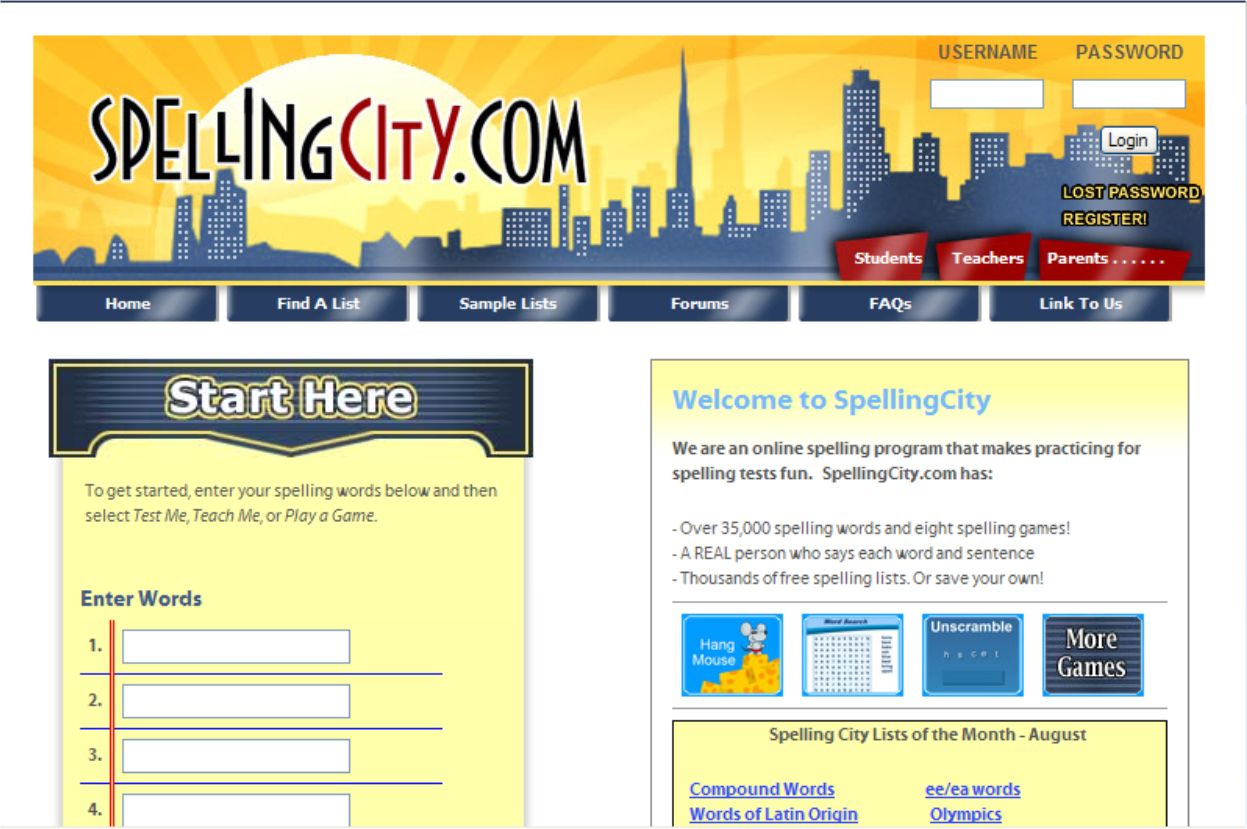
Spelling City is a website dedicated to learning and having fun with spellings. You can create your own wordlists by entering 1, 5 or 10 words to learn. Once you have done this, you have three options – “Test Me”, “Teach Me” or “Play a Game”.
When you click “Teach Me”, you can go through the spellings one by one. The spelling is spoken aloud, then it is spelled aloud, then it is spoken aloud in a sentence before it is finally repeated again.
When you click “Test Me”, you come to a window where you have to type in the spellings. By clicking the “Say It” button you can hear the word spoken as many times as you wish. By clicking the “Sentence” button you can hear the spelling in a sentence. This gives the spelling a context. The speaking is in an American accent, but this should not cause too many difficulties. When you have typed in all of the spellings on the list, you click the “Check Me” button to find out how many of the spellings you got correct. You can print out a report or a certificate of the test.
When you click “Play a Game”, you have the option of playing one of eight games: Wordsearch, Hangmouse, Unscramble, Audio Word Match, Which Word, Missing letter, Crossword, Unscramble Sentence. The games all have the purpose of consolidating the learning of spellings in a fun way. These games can be played using your own lists or using lists already loaded onto the site.
Teachers can register onto the site. Once you do that, you can save your own spelling lists onto the site where they will remain unless you remove them. The site also has forums where you can post comments, questions etc.
This is quite a useful site where pupils can learn spellings in a fun and interesting way. It could be used by all classes in the primary school either as class lessons using an IWB or individually on laptops or PC’s. The site can be accessed at:

Spelling Website
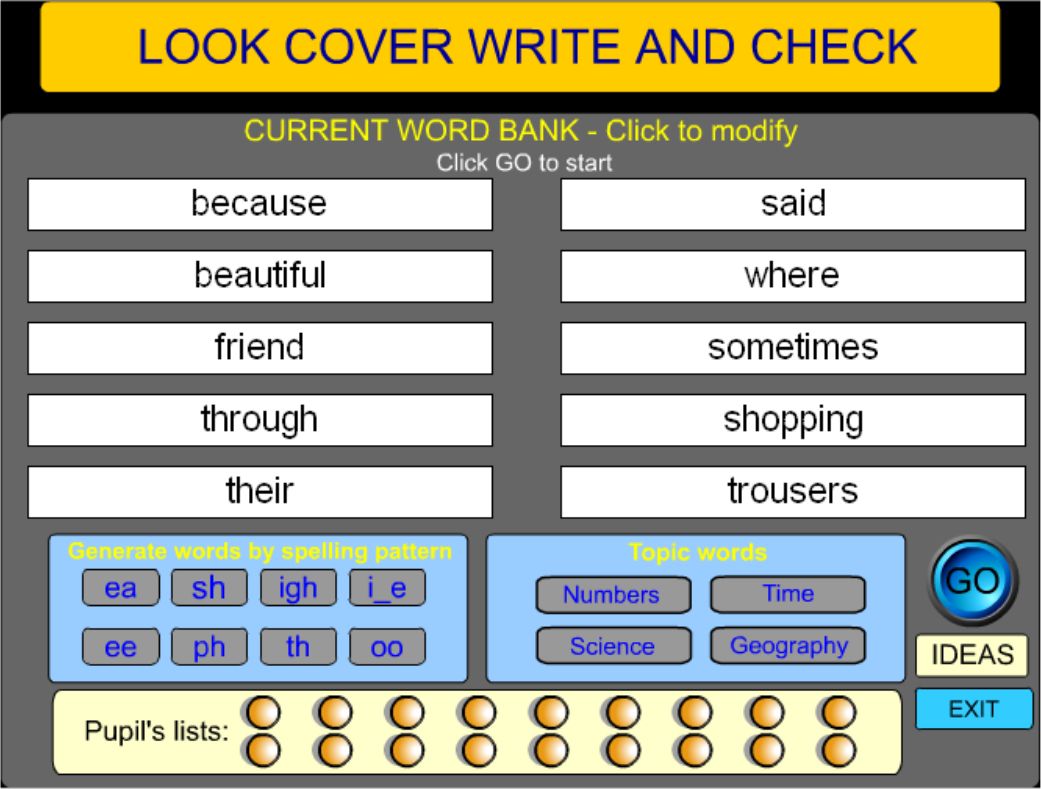
“Look, Cover Write and Check” is a nice online spelling programme demonstrating the commonly used methodology for learning spellings. There is no software to download so the game is played online. There are sets of word lists incorporated into the programnme, each list with ten words to learn. Some lists are based on spelling patterns eg. -ea, sh-, -igh. Others are based on topics eg. numbers, science, time. It also has “Pupil’s Lists”, some of which are random spellings, others are themed lists like art words and computer words. Once you select a list you click “Go” to begin the game. A new window appears which lets you look at the first spelling to learn it. You then click the “Cover” button and a hand comes across the screen and covers the spelling. You then have to type the spelling in a box and click “Check” to see if you typed it correctly. If you get the spelling correct, you move on to the next spelling (again using the “Look, Cover, Write and Check” approach). If you get the spelling wrong you can look at it again, cover it and try to write it again.
While the programme is quite simple to use, it is also quite effective in teaching children the methodology to use when learning spellings. This programme could also be useful to use on an Interactive White Board to teach a class lesson on spelling. The programme can be accessed at:
http://www.amblesideprimary.com/ambleweb/lookcover/lookcover.html

Irish Famine Book
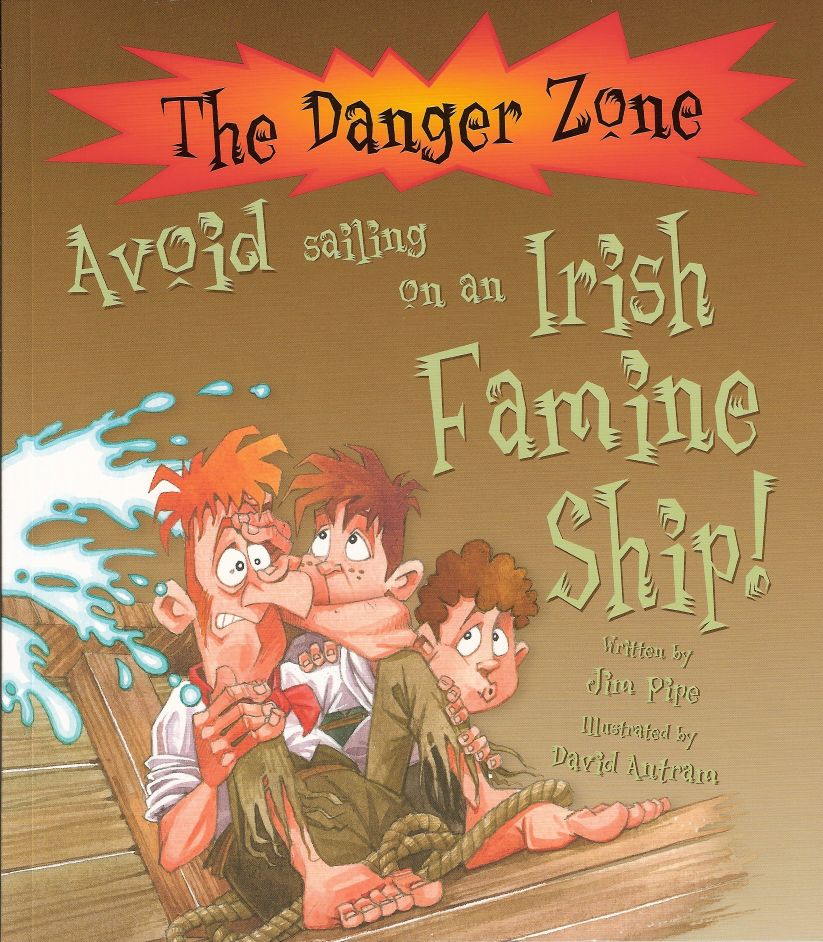
“Avoid Sailing on an Irish Famine Ship” is a newly published book based on the period during the Great Irish Famine of the 1840’s. It is part of “The Danger Zone” series of historical fact books. What’s different about this book on the famine is its treatment of the subject. Very often teaching about the Irish famine can be a bit boring for the pupils, however much the teacher tries to liven up the subject. However, this book tells the story of the famine in a simple, colourful and yet apparently historically accurate way. While you may think that the book title and cover illustration minimises the true significance of the famine to Ireland, nevertheless the book does treat the theme well and is very suitable for pupils in the middle and senior classes in the primary school.
In terms of content the book is well laid out and follows a logical sequence of events. The reader is told that you are Brian Walsh, living in the West of Ireland in the 1840’s and the story of your life during the famine period is re-created. All the important events of the famine are included in the book: the reliance on the potato for food; the absentee landlord system; the workhouse; the potato blight; the famine ships; famine fever; coffin ships; arrival in the new world. The book is full of colourful illustrations, some of them almost comic book style. Yet these do not diminish the story being told. Instead, I feel that they may serve to make the theme of the famine more accessible to primary school aged children. Each chapter is given a double page in the book. The chapter tells the story of how you, Brian Walsh, are affected by the events of the famine as they are happening. Each chapter also has a “Handy Hint” box with tips for Brian as to how he might survive the events in the chapter. A glossary is included at the back of the book explaining some of the terms used in the book. An index is also included.
At only 32 pages long, the book is quite short, nevertheless I still found myself learning things about the famine that I didn’t know: eg. People on famine ships were allowed to cook food on deck using wooden boxes lined with bricks. Such fires claimed many lives; Some famine ships sailed to Canada instead of New York as it was cheaper; During the five famine years 50 ships sank as a result of hitting icebergs. Pupils will be interested in the fact that in one workhouse 150 boys had to share 24 beds!
The book is written by Jim Pipe, who lives in Dublin, and illustrated by David Antram. For a book that is about the Irish famine, it is ironic that it is published in Great Britain and printed and bound in China! Other titles in the series are: “Avoid Sailing in the Spanish Armada”; “Avoid Exploring with Captain Cook”; “Avoid Sailing with Francis Drake”; “Avoid Sailing on the Titanic”; “Avoid Becoming a Pirate’s Prisoner”; “Avoid Sailing on a 19th Century Whaling Ship”.
The ISBN of the softcover version of the book is 978-1-905638-78-9. I bought my copy from Dubray books for €9.00. I’m sure it’s available in most bookshops and it’s well worth having in your classroom if you are thinking of teaching about the famine.

Children’s Books Forever

Children’s Books Forever is a website that has free downloads of children’s books. The books are downloadable in .pdf format, so you need to have Adobe Acrobat Reader installed on your PC/Laptop in order to view the books. The site includes picture books and books for early readers all by American author Hans Wilhelm. The books are intended for use as a whole class exercise using a digital projector or IWB. They can also be included into Powerpoint files. The illustrations in the books are high quality and attractive. The print in some of the books is quite small and some children may have difficulty reading it from a distance. However, it may be possible to organise the class to be near the whiteboard when reading one of these books. It’s a site well worth a visit and is probably most suitable for the junior end of the primary school. You can view the books at:

European Geography Tutor
European Geography Tutor
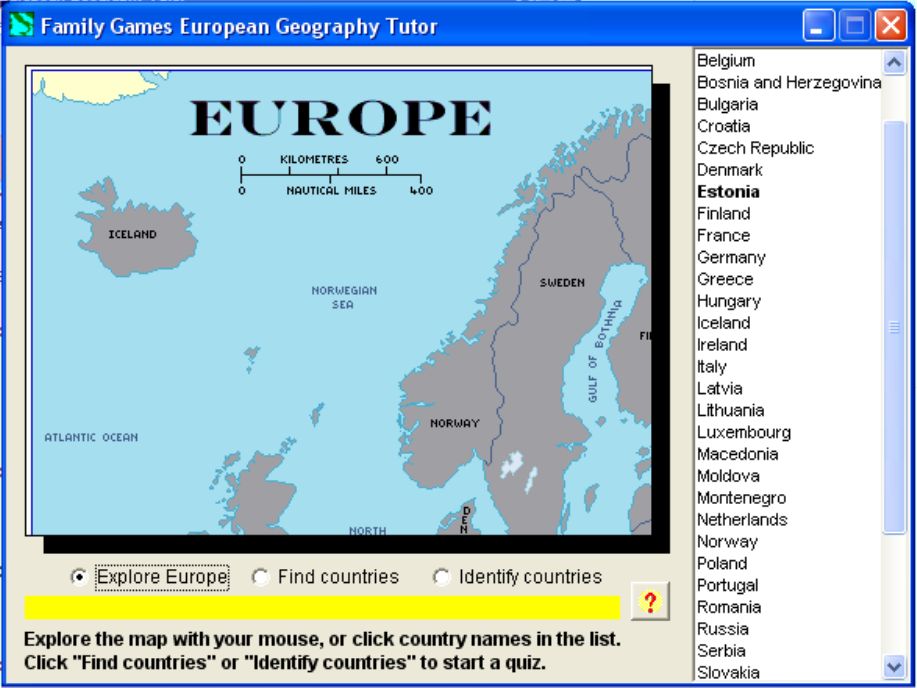
European Geography Tutor is a piece of freeware available for download from the internet. At 432KB, it’s a relatively small file for downloading. It downloads quickly and installs quickly. The programme window has a map of Europe on the left and a list of 39 European countries on the right. There are three ways to use the programme. Firstly, the pupil can simply explore the countries of Europe. This is done by simply moving the mouse over a country, which highlights the country in colour. The name of the country is written on the country and it is also highlighted in the country list on the right. When pupils are comfortable with the names of the countries, they can take a take a quiz. The programme asks pupils to find a country in random order by clicking on the country on the map. Alternatively, a second quiz highlights a country on the map and asks pupils to identify the country in the country list.
The programme is simple enough to learn and pupils should have no difficulty understanding how to play the game. However, the three activites mentioned above are the only activities which pupils can play, so there is little variety in the activities. Another drawback is that the programme window is in the centre of the screen and cannot be maximised. This means that the pupil cannot view the map of Europe in its entirety and must scroll up/down or left/right to find a country. Nevertheless, teachers may find the programme useful to help pupils learn the countries of Europe. The programme can be downloaded at:
http://www.greece.k12.ny.us/task/freeware/European_Geography.exe