
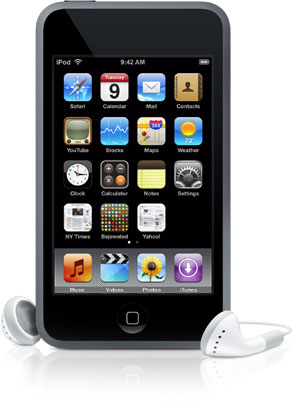
iPod Touches – the Classroom Set-Up
For anyone contemplating introducing iPod Touches into the classroom, the following is a brief summary of what the set-up in the classroom involves. For starters, the iPods themselves are the entry model 8GB version which we have been assured is more than appropriate for the classroom setting. This memory is sufficient for approximately 100 apps, which would almost be too many to have in the classroom situation. This version of iPod retails in the shops for approximately €189. Apps are available in the iTunes store – many are free, many have a nominal cost ranging from 79c to €2.99 at the lower end of the scale. The interesting thing is that the cost of each app is a one-off – you pay once for the app and this can then be added onto each iPod.
Sligo Education Centre, which has organised the iPod Touch in the Classroom local pilot project, has loaned the school an Apple Mac. iTunes was set up on the Mac, and then each individual iPod had to be named and set up with iTunes on the Mac. Initially, this was time consuming, but this process was done by the company who supplied the iPods. When I wish to download a new app or podcast, I do this onto the iTunes account on the Mac and then sync the iPods to iTunes on the Mac. This can be done using a 10-port USB hub, and depending on how large in file size the app is, or how many apps I have downloaded together, it can take no length to sync the iPods.
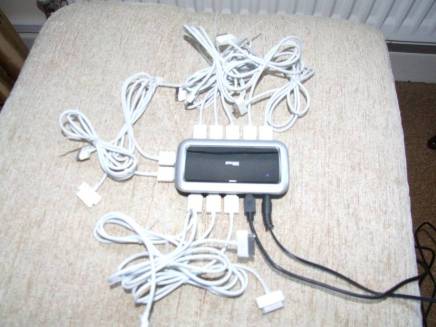
10 Port USB Hub
Depending on how much the iPods have been used during the day, they don’t need to be charged all that often. If they have been used a lot they will need to be charged that evening so that they are ready again for the next day. Up to now I have been either taking them home and charging them at night or charging them during the morning period at school. Charging can be done at the same time as syncing them to iTunes using the Apple Mac and the 10-port USB hub. The hub is plugged into the mains and into the Mac via USB, with each iPod being attached to the hub. At the moment I have been charging the iPods approximately every second day.
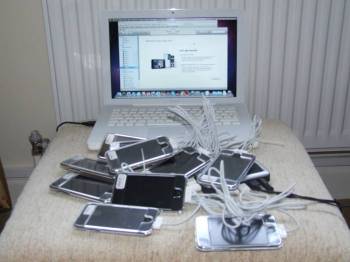
It looks like a right tangle seeing 10 iPods connected to the Mac
Safari is the browser that it used on the iPods to connect them to the internet. An Apple Airport router is located in the classroom and connected to the school broadband connection. Each iPod connects to the router wirelessly, however the connection has initially to be manually set up on each individual iPod inserting the password to allow the iPod to connect. Once this has been done, the iPods should connect wirelessly to the internet each time they are used. There have been times when the connection has broken down and the set-up just had to be repeated which does not take that long. Sometimes, the strength of our school broadband has also been an issue in trying to make the connection to the internet.
 Apple Airport Router
Transporting around 29 iPod Touches and making sure that they do not get damaged in the process has been anticipated. As well as each iPod having a hard plastic protective covering, they have also been supplied with a metal case in which to store the iPods which makes it really easy to carry them around, together with the USB hub. Although the case is not specifically made for the iPods, it is divided into three and ten iPods fit into each section with plenty of room to spare. As each iPod has been individually numbered, this also makes it easier for checking that all have been returned to their section in the case and also makes it easier for the pupils in charge of distributing and collecting the iPods. So the pupils know that numbers 1-10 go in the first section, numbers 11-20 go in the second and numbers 21-29 go in the third.
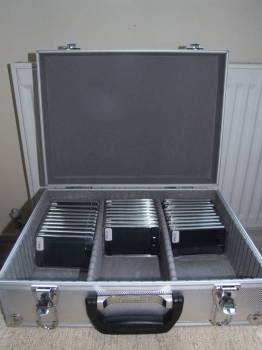
Metal case storing the set of iPod Touches
This classroom set-up may sound a little complicated, but you get very used to it and a routine begins to emerge with more use. We really still are in the phase of getting used to the iPod Touches in the classroom and what they can do. Very soon, I’ll write an article about what we have used them for, what the reaction has been and which apps have been the most successful. However, suffice to say at this point, they have been a huge hit with the pupils!
Tesselation
Worksheet with patterns that can be coloured to reinforce the concept of tesselation. (.doc file 55.5KB) (Source: Mags Mc Carthy) Download File…

Filmstrips Project
Just to update everyone on what has happened with this project to date. Many thanks to all who contacted me since I last posted requesting old Buntús filmstrips as well as history/geography/nature/science filmstrips. I received a great response. To date I’ve received more than 300 filmstrips! I’ve got almost a full set of Buntús filmstrips, except for the odd one here and there and I received none for junior infants (Imir agus Abair) – perhaps there may not have been any for that class? I have the full set of teacher manuals for the Buntús also.
What was surprising was the other filmstrips that were unearthed – lots of really interesting geography, nature and local history. Unfortunately, what is missing for these are the teacher notes, without which I feel the resource may not be as good. So if anyone has any notes to accompany any of these filmstrips could you please let me know. Now the filmstrips just have to be digitised and converted into Powerpoint resources! Hopefully, over the summer they will begin to appear on the Seomra Ranga website. Again many thanks to all for your interest and support.
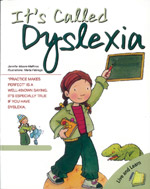
It’s Called Dyslexia
“It’s Called Dyslexia” is a new book recently published by Irish publisher O’ Brien Press. It’s written by Jennifer Moore-Mallinos, and was originally published in Barcelona, Spain. The colourful book is told from the point of view of the central character, Sarah. She tells of her life at school and how Dyslexia affects her ability to learn at school. She recalls her excitement about how she was looking forward to reading books all about dinosaurs, only to discover that she had difficulty reading the books. She talks about her emotions and frustrations as she grapples with learning to read and write. She says things like, “It’s very confusing”; “I feel sad”; “Why can’t I read and write well?” She then explains how there is hope for the future. She says, “I have dyslexia, but I’ll improve”. She explains how she gets some extra help from her teachers and her parents and how she learns new skills and strategies to help her cope with dyslexia. She recalls how she discovers a special talent that she has for writing poetry and gains such confidence that she reads her poetry to the entire class. read more…
Spelling Activities – Homophones
Spelling activities designed for Rang II focussing on Homophones. Activities include True or False, Solve the Clues and Word Worm. (.doc file 37.5KB) Download File…
Spelling Activities – Common Misspellings
Activities designed for Rang II focussing on common misspellings. Activities include Make the Word, Solve the Clues and Fill in the Missing Letters. (.doc file 45.5KB) Download File…
Spelling Test – Common Misspellings – Rang 3
Spelling Test designed for Rang III focussing on common misspellings. Pupils have to identify the correct spelling from four possible options. (.docx file 13.7KB) Download File…
Spelling Test – Common Misspellings
Spelling Test designed for Rang II focussing on common misspellings. Pupils have to identify the correct spelling from four possible options. (.doc file 50KB) Download File…
Spelling Activities – Compound Words
Spelling activities designed for Rang II focussing on Compound Words. Activities include Make the Word, Solve the Clues and Fill in the Missing Letters. (.doc file 45.5KB) Download File…
Spelling Activities – Common Misspellings
Activities designed for Rang II focussing on words that are commonly misspelled. There are three activities: True or False, Solve the Clues and a Word Worm. (.doc file 39.5KB) Download File…